 Indonesian
  English
  Chinese
  Japanese
  Hindi
Hindi  Spanish
  French
  Arabic
  Bengali
  Russian
  Portuguese
  Korean
  German
 This article provides a resolution for “Internal Error 2318” that may occur during the installation of CAD products.
Issue:
To resolve this installation error, perform the following steps:
- Disable .NET Framework 3.5:
- Open the Control Panel.
- Navigate to Programs > Programs and Features.
- On the left-hand pane, click Turn Windows features on or off.
- In the “Windows Features” dialog box, locate and uncheck the box next to .NET Framework 3.5 (includes .NET 2.0 and 3.0).
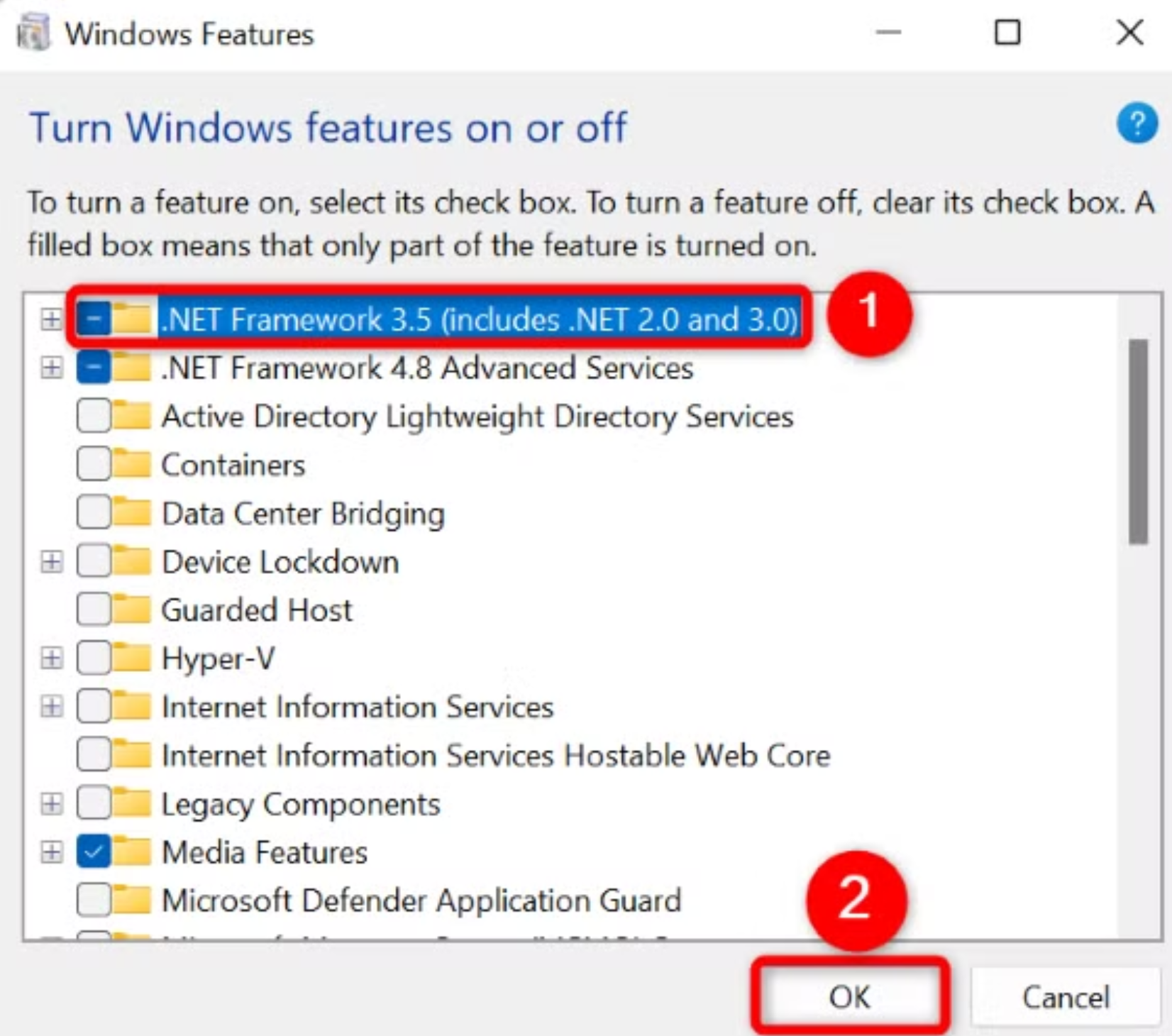
- Click OK and allow Windows to apply the changes.
- Restart your computer.
- Re-enable .NET Framework 3.5:
- After the system has restarted, return to the Turn Windows features on or off dialog box (Control Panel > Programs > Programs and Features > Turn Windows features on or off).
- Check the box next to .NET Framework 3.5 (includes .NET 2.0 and 3.0).
- Click OK and allow Windows to complete the re-installation of the feature.
Tinggalkan Balasan